


MYIO
4.7609.00 Reviews
App Specs
- Version
- 1.1.64
- Updated On
- License
- Free
- Downloads
- 100,000+
- Developer
- Valant
- Categories
- Medical
- Platform
- Android
Screenshots
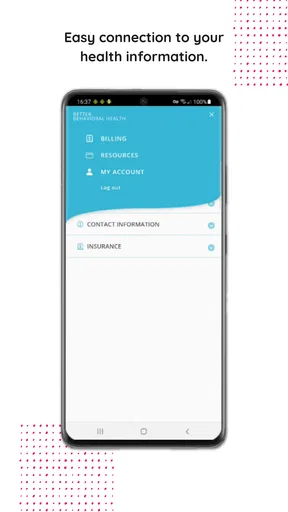
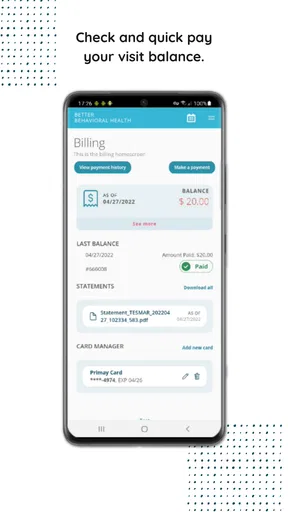
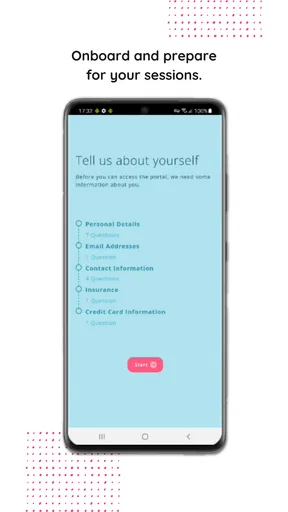
 Analysis by AppCompare
When several people share a home, the hard part is often not making a list but keeping track of who needs what, and when. That is where a behavioral health portal can have a very different role from a household organizer. MYIO is a medical app from Valant, and I would approach it as a place to support care-related routines, not as a general-purpose family planner. Its value depends on whether your behavioral health provider uses it and what they make available through it.
A shared phone is not the same as a shared account
Picture a parent using one household tablet to check a care-related message before school pickup, while another family member later uses the same device for an unrelated task. The practical question is not simply whether the tablet is convenient; it is whether each person can keep their account and information separate. I would use individual sign-ins where appropriate and avoid leaving a care portal open on a device other people can reach. A shared screen can make scheduling easier, but it should not turn private health details into shared household information.
This distinction matters more here than it does with a shared grocery list. A list of ingredients can usually be visible to everyone who is cooking; behavioral health details deserve more care. If you are helping another person, agree on what they want you to handle before using the portal together. Support can mean reminding someone to check their own account, not reading every message or managing every detail for them.
Start with the provider relationship
The first useful question is whether your clinician or practice works with MYIO. Since it is a behavioral health portal, it makes most sense as part of an existing care relationship rather than as a standalone wellness tool. If your provider does not use it, downloading it alone is unlikely to replace the usual route for appointments or communication. I would confirm the practice’s preferred process before relying on the app for anything time-sensitive.
After that, keep setup focused. Use the account intended for the person receiving care, and check that the contact details and sign-in method are correct before treating the app as part of a routine. On a shared device, sign out when finished if others could access it. These are simple habits, but they reduce the chance of mixing up who is looking at what. I would also keep the provider’s ordinary contact route available, especially while learning how the portal fits into the practice’s workflow.
Using MYIO in a household routine
I find MYIO works best in a household when everyone treats it as a care-specific stop in the day, rather than a shared command center. In this section, I focus on how to build a modest routine around the provider relationship while keeping household reminders and personal health information in their proper places. Clear roles make that routine easier to sustain.
Coordination without taking over
Portals can be helpful when a household is coordinating around care, but I would keep the roles clear. A family member might help someone remember to check the portal, or sit with them while they work through an account question. That is different from assuming the app offers family management or shared access. The person receiving care should remain in control of their information wherever possible, and any involvement from someone else should be agreed on rather than presumed.
Worth Reading Before You Choose

EA SPORTS FC Mobile 26 Is a Bigger Football Game, but It Takes Time

Flipboard Shows What News Apps Must Do Beyond the Feed

Switching to Android Auto Means Rethinking Your Driving Routine

Google Calendar Makes a Crowded Week Easier to Manage

Ludo King Makes the Most of the Minutes Between Plans

Baby Panda World Brings Quick Play to Modern Phones, but Its Game Library Feels Busy
For a realistic weekday example, imagine someone has a busy morning and wants to check their care-related information before leaving home. They can make that check part of an existing routine—perhaps alongside reviewing the day’s calendar—without making the portal the household’s main planning system. If another person is helping, a brief reminder may be enough. This small workflow is often more sustainable than asking everyone in the home to monitor the same account.
Compared with ordinary calendar, messaging, or to-do apps, a behavioral health portal has a narrower purpose: it belongs in the care relationship. General tools are often better for meal planning, school pickups, shared chores, and household reminders. The portal is the more relevant place for provider-related activity made available through it. Keeping those jobs separate prevents the common mistake of expecting one app to organize everything and avoids putting private care information into a general shared list.
Age, privacy, and trust
The app’s content rating is Everyone, but that is not a substitute for deciding whether a particular account or device setup suits a child, teenager, or adult. A household should consider who owns the account, who can unlock the device, and whether the person receiving care is comfortable with another person nearby. For a younger user, a parent may be involved in care, but I would still make privacy and age-appropriate independence part of the conversation rather than assuming a shared login is the answer.
It is also worth remembering that a portal is not necessarily an emergency channel. If someone needs urgent help, use the appropriate local emergency service or the provider’s established urgent-contact instructions instead of waiting for an app response. This is a practical boundary for any care-related digital tool: it can support ordinary coordination, but it should not replace urgent help or a direct conversation when one is needed.
What to expect from the app
MYIO is free, and it has an average rating of 4.8 from around 4.6 thousand ratings, with more than 100 thousand installs. Those figures suggest that many people have found a reason to use it, but they do not tell me whether it will match a particular practice’s setup. The developer is Valant, and the app is listed for Everyone. It was released on October 29, 2022; version 1.1.61 supports Android 6.0 and later.
That Android requirement is useful if you are deciding whether an older household phone can serve as the device for an account. Still, I would avoid leaving the app signed in on a device that circulates among family members. If someone changes phones or shares devices, it is sensible to check access and sign-in arrangements directly with the provider rather than assuming information will move or permissions will work in a particular way.
Where it fits—and where it does not
I would recommend MYIO to someone whose behavioral health provider uses it and who wants a dedicated digital point of contact for care-related tasks. It may also suit a person who benefits from a predictable routine: check the portal at a chosen time, deal with what needs attention, then return to the regular calendar for the rest of the day. That separation can make care feel easier to keep track of without turning every household conversation into a discussion about health information.
I would not choose it as a replacement for a family calendar, a shared shopping list, or a general habit-building app. Nor would I install it expecting it to provide therapy, diagnose a concern, or automatically coordinate a household. A general organizer is better for shared errands; the provider’s usual communication method may be better when a quick answer is needed. The right choice depends less on the number of features than on whether the tool matches the task.
If you are deciding whether to use it, ask your provider how they expect patients to use the portal, what kinds of care-related tasks they handle there, and what to do when something is urgent. Those questions help set realistic expectations before the app becomes part of a routine. I would also ask how a caregiver should be involved if the patient wants help, rather than sharing credentials as a shortcut.
My household verdict
For me, the strongest case for MYIO is a clear one: it can serve as a dedicated behavioral health portal when it is connected to the person’s provider. That focus is also its boundary. It should not be treated as a family dashboard or as a substitute for the tools people already use to coordinate everyday life. On a shared device, careful account habits and mutual agreement matter more than convenience.
With more than 550 reviews and a free download, it is easy to see why someone might want to try it when their practice recommends it. I would take that step with a specific purpose in mind, confirm the provider’s workflow, and keep household planning elsewhere. Used that way, it can have a sensible place in a care routine without asking a medical portal to do a job it was not built for.
So, I’ve been diving into this app called MYIO, and let me tell you, it’s quite the ride. If you’re like me, always juggling a million things at once, this app might just be your next best friend. It’s designed to be your ultimate personal assistant, organizing everything from your grocery lists to your work deadlines. Let’s break it down and see what makes this app tick.
Getting Started with MYIO
First things first, downloading MYIO is a breeze. It's available on both Android and iOS, so no one's left out. Once you’ve got it installed, setting up is straightforward. It asks for some basic permissions – think calendar access, reminders, that sort of thing. Nothing too invasive, just the essentials to make sure it can actually help you stay organized.
The interface is sleek and clean. I’m a sucker for a good-looking app, and this one doesn’t disappoint. Everything is intuitively laid out, so it doesn’t take long to figure out where everything is. You’ve got your dashboard front and center, showing you a snapshot of your day, week, or even month if you’re feeling particularly ambitious.
Features That Stand Out
One of the features I really dig is the task manager. You can create tasks, set priorities, and even assign due dates. It’s kind of like having a personal secretary in your pocket. Another neat feature is the ability to sync your tasks with your calendar. If you’re already using a digital calendar, this integration is a game changer.
But wait, there's more – MYIO also includes a habit tracker. If you’re trying to build new habits or break old ones, this feature is super handy. It’s a constant reminder of what you’re aiming for, and let’s be real, we all need that little nudge sometimes.
For those of us who love a good list, the app doesn’t disappoint. You can create lists for just about anything – groceries, books to read, even movies to watch. And, in a cool twist, you can share these lists with friends or family. So if you’re planning a trip or a party, collaboration is just a tap away.
Why You Might Love It
There’s something incredibly satisfying about checking things off a list, and this app delivers that dopamine hit in spades. It’s also a relief to know that all your stuff is in one place. No more flipping between apps trying to piece together your day.
I also appreciate the notifications. They’re timely and not too aggressive. You get a gentle reminder when something’s coming up, which is perfect for someone like me who tends to get lost in the hustle and bustle.
A Few Things to Consider
Now, while MYIO is pretty fantastic, it's not without its quirks. I noticed that the app can be a bit slow to load sometimes, especially if you have a ton of tasks and lists. It’s not a deal-breaker, but it’s something to be aware of.
Also, while the habit tracker is a great addition, it’s pretty basic. If you’re looking for something with more detailed analytics or customizable reminders, you might find it a bit lacking. But hey, for a general overview, it does the trick.
The Bottom Line
All in all, MYIO is a solid choice for anyone looking to get their life in order. It’s got a little bit of everything, and it does it all quite well. Whether you’re a student, a busy professional, or just someone who loves to stay organized, this app has something for you.
So, if you’re on the hunt for a handy helper to keep your life organized, give MYIO a shot. It’s a nifty little tool that just might become your new favorite app.
Pros
- User-friendly interface
- easy navigation.
- Comprehensive health tracking features.
- Seamless integration with wearables.
- Customizable alerts and reminders.
- Secure data encryption for privacy.
Cons
- Limited free version features.
- Occasional syncing delays.
- No offline mode available.
- High battery consumption.
- Requires constant internet connection.
FAQs for MYIO
What is MYIO and what does it do?
MYIO is a comprehensive organizational app designed to streamline your daily tasks and improve productivity. It offers features such as task management, calendar integration, and collaborative tools, making it ideal for both personal and professional use. The app aims to consolidate various productivity tools into one easy-to-use platform.
Is MYIO available on both Android and iOS?
Yes, MYIO is available for download on both Android and iOS platforms. You can find it on the Google Play Store and the Apple App Store, ensuring a seamless experience regardless of your device. It supports cross-platform synchronization, allowing you to access your data from multiple devices.
Does MYIO offer any collaborative features?
MYIO includes several collaborative features that allow users to share tasks, notes, and schedules with team members or family. You can create shared workspaces, assign tasks, and track progress in real-time, making it a valuable tool for both work projects and personal group activities.
Are there any costs associated with using MYIO?
MYIO offers a free version with basic features, but for more advanced functionalities, such as extended storage and premium support, there is a subscription-based premium version. Users can choose between monthly and yearly plans, depending on their needs and budget.
How secure is my data on MYIO?
MYIO prioritizes user data security by implementing robust encryption protocols and regular security updates. Your information is stored securely in the cloud, with strict access controls in place. Additionally, MYIO offers two-factor authentication to provide an extra layer of protection for your account.


